Showing posts with label search engine optimization. Show all posts

Wednesday, March 10, 2010

Splogs, Robo-blogs, and Article Directories - pick your poison

The question was raised recently about one of the remote blogs I was operating. The reader said it might be a robo-blog, but wondered, since the quality of the posts was very high.

And that is really what the difference between a splog, a robo-blog, and a remote blog is: quality of content.

Splogs are spam blogs and simply put the same content out over and over. 

Robo-blogs are low-quality posts which are not identical to other blogs, but are only modified enough to "fool" the search engines. (Which are noone's fools and actually penalize such blogs the same.)

True remote blogs contribute to the community they are found in and are nearly indistinguishable from other main or principle blogs they link to and support.

The trick is how to pull this off. You don't want to spend  your life creating original content for all these blogs. Or simply make too-numerous alterations so that each post appears "original".

There are several points to approach this with:
  1. Use a high-quality article spinner to turn out alternate renditions of each major blog post from your main blog.
  2. Create personal pages on each remote blogs and identities (aliases) which show real care.
  3. Keep each remote blog specific to a single line of content and not a lot of disrelated posts for various affiliate products. 
  4. Ensure each remote blog also links out to relevant content across the blogsphere and the web to assist others with their own rankings - paying it forward in advance, providing service just as your "main" blog does.
  5. Get a post creation and tracking system which won't kill you off from tedious over-work.
And since the get-rich-quick guys won't do all the hard, detailed work above, they only creat splogs - or at best, robo-blogs.

The overall point is to create versions of posts, and treat each remote blog as you would an article directory. But unless you want to create an article directory from a blog (and this is possible with self-hosted Wordpress now) you want to keep to a single, defined category of interest so that your remote blog becomes another trusted authority to the search engines - and even competes with your main blog. (I've seen some of my remote blogs rank higher than my main blog at times - which is fine, since it also links to any affiliate product I'm supporting, and my own book sales.)

Essentially, then, you are just continuing the "conversation domination" techniques. The same as if you created Weebly sites, Squidoo lenses, or post your blog articles to Zimbio, post presentations of that same material to Slideshare, record podcasts and host on Archive.org, or make videos and post through Tube Mogul or PixelPipe.

But if you try to take the quick route - you wind up penalizing your main blog and wiping out its standings.

Your choice of poison.

- - - -

Oh - you might have seen that if you take our excellent content and have a quality article spinner to run it through, you can also post it to numerous article directories - or unique versions of it, any way. Write once, publish many times and ways... Check out your blog production flow and see if this might not make it more efficient.

Wednesday, February 25, 2009

Small Business Marketing Insight Tip #7 - Wordpress, SEO, and technical hocus-pocus

(photo credit: augustinrouchon)
All things build in Wordpress SEO marketing - especially for small businesses.

(Warning: technical search engine optimization verbiage ahead - not for the faint at heart...)

Your blog has to have good content, but it also reflects your business plan. Like the Russian nested dolls (matryoshka's), everything builds around the earlier one.

This is one thing that has kept me from really building out my own sites, that I kept finding another doll inside the one I was working with. Right now, I think I'm close to the smallest possible one.

Now: follow this chain of thought -
  • Each product line you have - and we are talking mostly info products, although this is applicable widely - should have it's own mail-list (autoresponder series, or A/R).
  • These product lines build into your product funnel. Cross-sales and up-sales. "Would you like fries with that?" and "Supersize your order?"
  • As well, if you can set up mini-sites for each product line, that drives both SEO/linklove and keeps product lines distinct.
However, if you have a single Wordpress-driven site (and this is currently the best and easiest way to build sites), you have a common template for all pages. Means you can only promote a single A/R opt-in - or nothing.

The solution is to do custom templates and set up every category as a subdomain.

This essentially gives you a mini-site, since (for the time being) Google classifies each subdomain as it's own domain. Of course, they are all on the same IP address, so you won't get the real linklove you deserve - but organizationally, this starts to un-nest those dolls... Here's how it works:
  1. Get a plug-in to make your categories into subdomains (there are several out there - I'm still evaluating them).
  2. Set a custom template for each one. Means you can put an opt-in form for that product on that set of pages.
  3. Your category pages then talk about a specific product line - in my case, it's best seller famous authors who have written self-improvement books. (At that link, you may find I haven't implemented this yet - life itself is a work in progress, and this blog is to brief you on the news as I find it - excuses, excuses. )
Now, this doesn't mean you can't have a static landing page. Just write a static page with your sales pitch and then set it to be a daughter page (junior) to another page on the site. (I'm not a big fan of landing pages, since I tell people how they work on my marketing sites. I then have to be far more honest and less hype-driven. Once you know how sales pages work, they are ineffective - but there is always the Collier method...)

Your external articles, remote blogs, other video content - all these can now link to your subdomain - or within that to a specific post. Or they can link to a specific static page, which then links to that subdomain (which might even get you more linklove).

The idea is to make it as simple as possible for your viewers and for the search engines.

Search engines see: keyword-subdomain.memorable-domain.com/keywordphrase.php

Because you set your Wordpress Blog to lay out the category and post title in the permalinks - and your categories become the subdomain.

With me so far? OK, so I need to do a complete write up on this at some point with sequences and everything - and as I re-release the Online Millionaire Plan (under different title, same brand), I'll get this out to you. (And as you subscribe to this blog, you can be the first to know...)

But your categories are your main keywords, right? How do you know that you have the right categories before you make them into subdomains?

Next point: supercharging your keyword lists with RankTracker

(That link above tells you briefly how and why to use RankTracker - and I really probably owe you a video on this.)

I was messing around a couple of days ago and found how to pick your categories when you're looking for keywords.

Simply, I was wanting to see how usable two keywords were. However, they gave me tons of new stuff. And within that new stuff were more categories I could use.

Essentially, you look up your keywords in the Google Adwords KeywordExternalTool, then get these text files and drop them into RankTracker. This program then finds your KEI - you then take anything above 100 and run it through Suggest->WordTracker and find the related high KEI terms. Copy/paste these into a spreadsheet and sort - at least that was the earlier method.

Now: watch closely...
  • Taking that whole set of keywords once you're finished finding keywords with the WordTracker step - now, take out your low KEI and low traffic keywords. Save your work.
  • Copy/paste the whole long link into your spreadsheet (I use OpenOffice - your mileage may vary.)
  • At this point, you can search within OpenOffice for keywords ("find all") and then assign a background color to that series of KW. Makes your spreadsheet look very nice and easy to see relative values of keywords to each other - even if they are disrelated. But hang on there...
  • Sort by competition and insert a row between everything above 3mil. Color it something distinctive. Now sort everything above that color bar by KEI, first by number of keywords in ascending order and then by KEI in descending order. What you wind up with is high KEI terms which have too much competition. (You have the spreadsheet do both sorts at once, so your 1-word KW's show up in KEI order above you 2-word KW's, etc.)
  • Now, take each of those terms at it's base ("biblical" and "bible" have "bibl" as a base, "christian" and "christ" have "christ" as a base) and search for these in RankTracker. This gives you all related terms which a search engine will also find.
  • Copy/paste your search results into a second sheet on the spreadsheet - one after the one you put the entire list on. Rename it with the keyword base you just searched for.
  • Do this for all the top KEI single-term keywords you found. Each base term gets its own page on the spreadsheet - just add more until you have everything you want.
  • Then sort out the pages by competition, then by KEI and you'll have what you want. (See the note below on this sequence if this is new to you.)

And you now have your publishing sequence. Work from the top down with articles and blog posts, etc. and you'll then take over that high KEI single term keyword as you take over the smaller niches.

Discussion

Where you find a high KEI search term that has few subordinate long-tail niches, you can skip it. Example: "Spirituality" search gives "healing", which gives "crystals". Related terms also gives you "crystal meth", "Crystal Gunn" (porn star) and "crystal balls". While crystal ranks high, if you take this down to only healing-related keyword phrases, you have little to work with. If you want to talk about crystal balls, there's a lot to talk about. Otherwise, no. "Bible" on the other hand, is massive with ripe keyword phrase niches. (But it's been around some 4,000 years...)

So your base terms (tidied up for your viewers - add the 'e' back to Bible) become your categories. Your long-tail niche keywords are the basis for your post names. As your categories become your subdomains - Google then thinks this particular (subdomain) site is all about Bibles, since every post on it discusses some other aspect about Bibles. And linklove is spread all around, since you will have pagerank just for that subdomain - while your crosslinks then share it with your ecommerce site.

And as you do your keyword searches, you'll find more categories - which can simply be added to your site, and they can be turned into subdomains, etc. etc.

That's a bit thick above, but when you do it for yourself, it becomes very clear. (Yes, I need to do a video on this, don't I? Well, as I can get to it, I will - look for the revamped Online Millionaire Plan coming to an embedded YouTube video near you...)

The point is that now you don't have to guess at what categories to use. You simply go after the top keywords by publishing effective content, properly optimized, which takes over the long-tail niche phrases. These then start ranking you higher for the high-competition, shorter keywords.

And since your subdomain is (currently) given the importance of a site, you are now creating a niche site just for that exact keyword. Google will love you for this one.

With separate templates for each subdomain, you can tweak up these subdomains to actually look like different sites - like mini-sites - and have them all crosslink neatly.

(And if you really wanted to take this right on out, you'd set up WordPress MU for a multi-user environment - and then you'd really have separate mini-sites for each product. But your maintenence costs - in terms of time - really expands with this idea. By having everything on one blog, you can then simply add more content without having to log into each blog, etc. I guess you could do it as an administrator...)

Subdomains with custom templates look to be the most elegant application at this point.
  • Linklove - Google treats these as separate domains, each cross-linking, so greater trusted authority for each.
  • Segregated product lines - so you can actually maintain several diverse lines without conflict. Someone who knows all about Dogs isn't expected to know much about Bibles.
  • Customized user experience, so you can tweak each subdomain template to get better conversions without changing your main template.

But you still have to surf each subdomain as a newby user and see that the way you have your template makes sense for that subject area - "sense" is what the viewer expects to find.

- - - -

Setting up your spreadsheet to make the best of your keywords from RankTracker.

Here's the sequence:
  1. You have your spreadsheet and RankTracker open, with your keywords searched the way you like them.
  2. In RankTracker, delete any keywords less than 2.0 in KEI and less than 20 in traffic. Don't delete anything else.
  3. Now, copy and paste the entire KW list into your spreadsheet (the registered/paid version of RankTracker allows you to do this...)
  4. Sort your whole list on the spreadsheet by competition, ascending (biggest toward the bottom).
  5. Insert a (colored) row between everything above 4 million.
  6. Select and sort only that bottom section by KEI, descending (biggest toward the top).
  7. Sort everything above that bar by traffic, descending.
  8. Insert a row at less than 100, and then color it.
  9. Sort this middle section by KEI, descending.
  10. Now, sort the top section by KEI, descending.
What do these sections mean?
  • Bottom section gives you your top keywords to take over.
  • Top section gives you the sequence of content to publish to do that.
  • Middle section is full of "less profitable niches" as traffic is lower - so you have to write more content to get the same amount of total traffic. But competition is waaaay lower, so...
Why these arbitrary numbers?
  • About 1 percent of sites are properly/accidentally optimized. By taking 3 million competing , you will wind up (roughly) with 30K pages to compete with (WordTracker says that's a niche). Analyzing the top 10 out of these sites will give you what you need to do to compete with/out-create them effectively.
  • You want at least 100 per day coming to your site. But the smaller traffic niches also usually have much lower competition - so if you can crank out pages, you'll be able to do five times the pages and have many times greater response. (Some niches actually have no sites optimized for them - easy pickings.)
  • If it doesn't have KEI above 2.0 or better, it's not worth your time. Some say 3.0 - but I've found that this throws out some hot sub-niches and can really limit your ideas for content.
  • You can pick any numbers you want, though. Try them out and you'll see what works best for you.
- - - -

OK? Well, I've got to run - a lot of content to produce on top of everything I'd already scoped out.

If you have a better idea or just think this is crock - feel free to comment...

Saturday, February 14, 2009

Natural SEO Tips - Keyword selection the easy way

(photo credit: .Bala)
Getting on your Natural SEO highway with easy keyword selection

Natural SEO really means finding what people are looking for/talking about and then putting an offer in front of them that's a real solution or improvement to their situation. Highways go somewhere - but with a map or not, you have to pick where you are going to travel before you get in the car and start driving.

I've covered before about using Ranktracker to find you top keywords cheaply and quickly.

In that method, I tell you to search for your keywords and then dump them into a spreadsheet so you can organize them better.

Just to recap how you organize these in that spreadsheet:
  1. Remove anything with a KEI (Keyword Efficiency Index) less than 2.0 or traffic less than 20.
  2. Sort by competition (low at top to high at bottom)and insert a row at about 3 million.
  3. Now, sort the fields above by traffic (high to low) and then insert a row at about 100.
  4. You now have three sections to your spreadsheet. Sort each of these separately by KEI, high to low.
This refines what I've laid out earlier.

Your first section is your prime search engine marketing niches. Not too much competition (in real terms, about 1 percent of your traffic on average is going to be anywhere near effectively optimized - and with social media promotion, you can quickly rise to the top of a 30K field) and sufficient traffic to make it worth your while.

Second section is the small niches which might add up to decent traffic at some point. You'll see here that the competition for these is much, much smaller. But if you have 20 visitors per keyword, you are going to need to keep up at least 5 niches in order to accumulate 100 visitors weekly. The trade off for lower competition is you have to invest more content.

Third section is the high KEI, high competition terms. Too much traffic to make headway with directly. But you target these by taking the smaller niches on one, by one.

How this works:

Once you've done many, many researches using Google Adwords KeywordExternalTool and RankTracker, you've now saved a lot of various terms for your product. All these keywords are somehow applicable to what you're targeting as a product. Take all these terms from these various spreadsheets and copy just the terms, pasting them back into RankTracker.

Do a new KEI update. Take anything over 100 and run through WordTracker Suggest (inside RankTracker) for any related terms. Now, weed out the obviously inapplicable terms while you still have them in RankTracker (I really have to do a video to show you how easy this is) and then copy the whole data set over into a new spreadsheet (or a new page on that spreadsheet).

Organize them into the three sections above.

Using your "Find" function, go down to the bottom section and start looking for the one- and two-term keywords with high KEI (and too much competition) - put that term into your Find and "Find All" occurances of that term. This will highlight all your niche phrases that contain that keyword. Here you can turn all these cells some light pastel color background to set them apart. (I'm doing this in OpenOffice, your mileage may vary in MSWord.)

Do the same for what you see as base keywords which are showing up in the two sections above. You'll probably have three to five base keywords which repeat several times in the sections above them.

Why you are selecting these is to figure out which niches you are going to write content for first. As you write killer link-bait for each of these long-tail niches and swamp the competition for that niche, you then start rising much higher for that Short Head keyword with all the competition sites.

This of course means that you are keeping in all the other basics of SEO, such as including your keyword phrase in title, headings, alt tags, and links.

Using these tools can actually start laying out how to approach your marketing - and make it easy in the process. Because you can basically ignore the items (at least for now) in that list which are great KEI, but don't add up to taking over a Short Head keyword.

How I found this was because I didn't feel I really had enough descriptive keywords for the product I was about to launch. But I had lots of spreadsheets laying around my hard-drive - so I gathered these up and ran them through the above sequences. By pushing all my keyword lists into one location, I could then talk about the same subject through different viewpoint - each content piece now designed to take over a niche keyword. (When do you quit writing on a specific long tail keyword phrase? When you run out of content, or your articles start taking more than one place in the SERPs, ie. you have achieved the top of that competition slot.)

Now I can lay out my publishing schedule and start creating the link-bait. (Means the next step will be to adjust my feed aggregators in order to get the precise data I need to create that content.)

You only probably have to do this once. But I imagine you will want to run this list through about once per quarter to make sure the KEI is steady - and to take advantage of seasonal swings. If you can find trends (Google Trends, Google Insight) for these long tail keyword phrases, consider yourself lucky. My experience is that they mostly won't show up, except for base keywords.

(And if you wanted to get real fancy, you'd copy these spreadsheets into a database so that you could start checking trends on these long-tail keywords - because they have such low traffic and competition that Google isn't going to show these very clearly, if at all. But databases are real left-brained and we don't need to go there to get started simply.)

Hope this helps you on your Natural SEO keyword highway.

And if you have a better route, or an easier way to find these - comment away...

Tuesday, February 10, 2009

Setting up ecommerce for your small business marketing - having all the pieces before you start.

(photocredit: Mahalie)

Ecommerce SEO is like a jigsaw puzzle -
you have to make sure you have all the pieces before you start.

I've been working with my chosen ecommerce engine - Zen Cart - for some weeks now, just getting it so it looks nice and runs the way I want it. No, it's not released yet - hidden behind a static page.

Here's the criteria for an ecommerce site:
  • Runs fast
  • Easy to customize
  • Huge community support
The next one: Free. I've been telling people to use cPanel hosting for years just because of these points above. You get free blogs and ecommerce engines you can install.

I chose ZenCart out of all of these, because it works just like that, right out of the box.

However, it lacks a few thinks which you are going to have to fix - like any site these days:
  • SEO permalinks
  • Google Analytics
  • Google SiteMap
(Of course, you want to get a good theme, but that is too personal to go into here.)

The good thing is that there are modules for these three above:
What you are doing with these is making your ecommerce site easy for Google (and other search engines) to work with. Needless to say, Zen Cart out of the box doesn't do these things. (Maybe a later version...) And so, if you are putting stuff into your ecommerce, you might as well be throwing it down a black hole unless you also tweak your Zen Cart to be search engine friendly.

[Now, I'm also checking out Google Checkout module and a beta version of Google Base module - but these are for another post.]

The point here is to get your site and your shopping cart set up so the search engines can find and rank you quickly.

I wanted to put these all in a single place so that anyone could simply update their ZenCart and "steal a march" on their potential competition.

Happy SERPs and profits!

How you can get instant top search engine positions - why remote outpost content repurposing works

Top Search Engine Real Estate On Sale for Fresh Content
I've been able to get near-instant top Search Engine positions - and hold them - but I wouldn't use this technique broadly until I understood why - and that secret was only disclosed to me recently.

The story goes like this:
I've laid out the complete theory of social-outpost-publishing, in and among some other data.

The short version:
  1. Write a blog post.
  2. Post it as an article, preferably on ezinearticles.com
  3. Convert it to a podcast and post to archives.org
  4. Create a Powerpoint and post to slideshare.net
  5. Combine with podcast and create a slidecast on slideshare.net
  6. Create a video from the podcast and slideshow and post to YouTube
  7. Take all these links and create a Squidoo lens
  8. Update your blog post with these links
  9. Release a press release telling all about it and include the above content links.
I created and posted a video which proved this, on a non-vital keyword - and checking recently found that the site I had pointed to was still in the top four on Google months later.

But I wouldn't use it broadly until I understood why. (Having a piece of the puzzle doesn't solve the whole jigsaw mess on the table.)

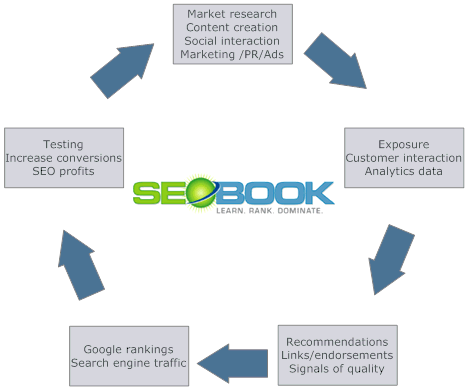
This post by SEO Book now gives the complete clue to its success:

(graphics credit: SEO Book - visit and subscribe to this great resource!)

Look in the bottom right-hand corner - "Recommendations, Links/endorsements, Signals of quality"

As they put it:
You typically have to create some number of social interactions to leave the trail of signals of quality to make Google want to trust a site enough to put it in front of a large traffic stream, especially if you are starting a brand new site and are trying to operate within Google's guidelines. As Bob Massa says "search engines follow people."
All of the above places to post are social sites - or getting that way. Blogs, videos, podcasts - all social. Even press releases and articles (though not commonly thought of in this light.)

You'll also notice that the sites posted to above are all heavy hitters with tons of pages on them.

What you are doing with this social outpost theory is posting inbound links on huge sites which all use the same link/keyword and post back to your little, unknown site. And so Google first finds these social sites and then finds your little site. What stays up is the little site, not necessarily the social sites.

Michael Campbell explained it some year ago with how people could use Digg to get their site ranking - but again, never said why it worked, just that it did.

Here's why -
  1. "Search Engines follow people."
  2. Large sites are given more authority ranking by Google.
That's why when you re-purpose content and post it to these big boys, you'll have a completely different result than posting the same content on your own blog. Because they are known and big, and you aren't. Linking from big sites to yours - all with the same inbound link - is a simple SEO tactic. And only with social media did this become possible. (Of course I did it because it saved bandwidth and prevented the "Digg effect".)

Why do your social posts disappear off Google? Because they themselves have to be "voted up" by the public. Until they do, they don't have authority. They'll show up to begin with, but later on, they'll be lower down the results. Like Alice's Cheshire Cat - all that's left is the smile.

But your site will be up there because of the links into it - which means authority sites "approve" of what you are doing.

I could go on and on with examples - but the above gives you the gist of things.

You can try this (as I'm about to relaunch quite a few project I've had simmering on back burners) but ensure that you have your backend ready first (a Word Press blog and ZenCart ecommerce engine - both SEO optimized for the keywords you are using).

Then test out the whole thing with information products - all given away as ethical bribes to get them subscribing to your autoresponder list.

Luck with this - Good Hunting!

- - - -

And if you think you could do better, if you have a better explanation - let me know...

Monday, October 6, 2008

"Conversation Domination" and SEO - Flaws and Failures

Why would you ever want to use "Conversation Domination" for SEO if you knew its flaws and failures?

Here's the first one:

1. Marketing is based on conversation. Conversation is - by definition - a turn-about process. "Dominating" a conversation means you control it completely.

Now - what does a person do with a conversation that is completely controlled by one person?

Leave - find somewhere else to converse.

Next:

2. Search engines evolve according to human needs and wants. Spammers find themselves isolated eventually, kicked off all search engines. Why? Spam is unwanted communication. A one-way flow. Old-style marketing tactics.

And:

3. When someone "dominates" search engines by taking several or all of the top spots for a given keyword, it means no one else can participate in that conversation. So, ultimately, this means that such techniques will eventually be labeled spam and search engines will move elsewhere.

But:

4. Original, great content is king - always has been. That's what the Internet was created for. So people could find information (content) they were looking for. Spamming your way to the consistent top of the search engines doesn't mean you have the best content - you've just figured out how to make the search engines think you do. And search engines ultimately penalize all spammers - drastically.

Also:

5. Marketing (ClueTrain Manifesto) means conversations - real conversations. I give, you take. You give, I take. No shortcuts. No "Igiveyoutake. Igiveyoutake. Igiveyoutake..." Doesn't work - except in extraordinary circumstances (jails, prisons, visiting in-laws). Usually temporary until situations are resolved.

Finally:

6. "Conversation Domination" (or anything touted as "domination") is a dead-end street - and it has "SPAM" graffitied on that back wall when you reach it.

7. But setting up a bunch of remote blogs under aliases to comment on your own stuff in order to raise its search engine ranking - just more spam. You've already got tons of backlinks coming in from all these tools above. Squidoo pages are fine - but if they are only about you, then they are just more old-style marketing, aren't they? Converse, don't pontificate or posture.

Why is OnlyWire fallen by the wayside, less important than it was originally - because people were spamming with it. Simple. Spamming isn't a conversation - it's old-style marketing. Social Media handles it by shunning and voting you off the island.

8. The real purpose of Marketing and Commerce is to provide something of value so people can improve their lives with it. That's how you earn word of mouth and client loyalty. No other way.

When you block other people's content by artificially and constantly grabbing the spotlight... Those actions just can't last.

- - - -
Real, timeless, practical approaches:

A. This doesn't mean you don't optimize your pages so search engines can read them easily. Doesn't mean you don't theme your pages so they make sense to the readers and the search engines at the same time. (Most people still don't do this - and there is no way to educate them to do this, so this is a completely valid solution.)

B. This doesn't mean you don't tell directories about your site. Still works.

C. Doesn't mean you don't submit (or auto-submit) your content changes to RSS directories.

D. It does mean you interact with people leaving comments on your site. It does mean that you track people commenting on your content and leave comments on their site - as well as linking to them.

E. It does mean to re-purpose your content in many ways, so lots of people can find it in a format they like. Articles, press releases, podcasts, slideshares, videos - and whatever else comes down this pike.

- - - -

If you do the first 1-7 above - I hope you sleep really well at night for all the "long-tail niche keywords" you've just "dominated". And while you're at it, don't forget to tape up that corner of the bigger-than-life poster of you on your bedroom door. And don't forget - you're sleeping alone most nights...

If you do A-E, welcome to the real world.

Keep your search engine optimization work honest and always a real contribution - and then you'll succeed way beyond your wildest hopes.

Because you are helping everyone win, helping them find the content they need to improve their lives.

Your views?

Tuesday, July 22, 2008

Wasting your time with extreme SEO

Don't waste your time with PageRank when you should be improving user experience.

8 Arguments Against Sculpting PageRank™ with Nofollow | AudetteMedia

This little page has a great deal to say about "no-follow" as an SEO strategy - both plus and minus.

I'm going to reverse myself where I told you to get Dr. Andy's Website Builder. Or any other. If you're like me and work just at getting stuff online at all, then you don't have time to spend on building these SEO-optimized pages. True, you should build mini-webs, particularly if you can afford to invest in separate domain names for them. But worrying about linking them with no-follow is a no starter. Worry about how the user can find and make sense out of them first.

Main scene: Google is devaluating PageRank and has been for years. Things change. Except for one point this article points out - the key point is user experience and always has been. That's why the search engines are putting social media on the front pages: better content.

So don't worry about Michael Campbell's various diagrams to build mini-webs and so on. Concentrate on building websites with great content. (Now, you can build mini-webs that are subdomain-based and link only within themselves, particularly where you are selling an affiliate link or a particular product. That makes sense. One link on the main page which lets them out - but only to your ecommerce page or to a sales link. But again, we're getting pretty geeky here. Concentrate on great content, user experience and you'll win.)

How you build a top-notch, profitable web site:
  1. Make a great landing page that is exciting and tells someone everything they need to know above the fold (first screen-full). Elevator pitch sells them on checking out the rest of the site. Has an opt-in for mail list, plus RSS feed.
  2. Use templates to simplify your Navigation and page building.
  3. Build with WordPress or similar blog function, where you don't have to worry too much about updating navigation links or search (even Dr. Andy is using this right now, as it simplifies adding pages immensely.)
  4. Concentrate, concentrate, concentrate on improving user experience for your site.
  5. Monetize everything - make everything contribute and everything count.
  6. Add pages daily, if possible.

Monday, March 24, 2008

How to tell about what you know to be true - keyword modifiers and organic SEO

Brought to my attention by SEOSmarty, this is a fascinating piece.

While I bring you the below as immediately useful, there is also more data on the page about what search engines like to find on your page. Bulleted lists, blockquotes - surprise, surprise - just the things people like to read (compare with the copywriting section of An Online Millionaire Plan).

Essentially, usable content is king.

Always back up your social media marketing with sound organic SEO techniques.

How to Grow an Organic Search Ranking using Thematic Search Modifiers | SEO Design Solutions SEO Blog: "The “most searched” obvious keyword modifiers first;

* Company
* Services
* Professional
* Best
* Top
* Leading
* Internet
* Organization
* Marketing
* Business
* Solution
* Online

Then the less obvious “Money Phrases”, such as:

* Rates
* Pricing
* Deals
* Affordable
* Offers
* Packages
* Quality

Then the GEO Specific Local Search Modifiers Such as:

* City Name
* Surrounding Suburbs
* State (including abbreviations NYC, IL, FL, WA, etc.)
* County Name"

Thursday, March 6, 2008

SEOmoz | Identifying the Linkerati

This nice post from way back in March 06, lays out some important clues as to who will be/is running and "guiding" our social media (more like trying to head cats - anyone who's worked with livestock knows that they lead better than they "herd".)

I don't hold this to be a sacrosanct list, nor are the importances the same they were in '06 - but this is a starting/jumping off point...

Oftentimes, when I describe the concept of linkbait to clients, it's critical to also describe those folks who are the targets of linkbait - I'll call them the "Linkerati". Let's explore the culture of these most valued of web-dwelling souls:
 * Bloggers - probably the most targetable and directly influenced folks, bloggers are an excellent source of traffic, links and the spread of your content's idea virus.
_ * Forum posters - although the links these folks put up don't often result in great search engine value, the traffic can be positive and the possibility that other likely linkers will come through to visit is also high.
_ * Web News Writers - a rare species, but exceptionally valuable, these folks control the news outlets on the web, including places like C|Net, Wired News, Yahoo! & MSN's online news portals, etc.
_ * Content Creators - These folks are building or beefing up websites and are seeking valuable resources to link out to. Most frequently, you'll find them linking to the sites they find valuable in the top 5-10 results at the search engines (another reason why "the rich get richer")
 _ * Resource Editors - Another rare breed, these folks work at government institutions, no-profit organizations and educational establishments and are looking to add content to their pages or directories.
_ * Social Taggers - These folks don't provide direct links, but if they and their friends at Digg, Del.icio.us, Reddit & Furl love you, you're in for a real treat - thousands of visitors and the opportunity to be in front of hundreds of link-hungry bloggers.
_ * Viral Connectors - The viral crowd doesn't directly link to you, but by sending out a blast e-mail, posting to an IRC channel or telling their friends about your site over dinner, they're spreading the word. Some of them can be very powerful, and they're not demographically distinct - a well-connected grandmother may know people in the media, executives of businesses and other highly placed and valuable minds.
* Journalists - Online or offline creators of "news" content, these influencers are among the most valuable of all the linkerati. A reporter for the Wall Street Journal, New York Times or the Seattle Weekly all have reach and ability to create links to your site, although it's often in a second-hand fashion (as some sites don't directly link out, but many bloggers "pick up" news items and do).

Any others I'm forgetting about?
SEOmoz | Identifying the Linkerati

Blogged with Flock

Wednesday, March 5, 2008

The continuing slow death of SEO...

And so the reason for SEO dying that slow death. People are still needing search engines for their normal traffic. However, search engines like Google are giving more sway to the social media.

So we then are being lead down a very social trail - by people who know that the search engines can be managed through social channels (and probably sensationalist media which are populist-oriented, however degraded it makes them...Yellow Journalism also had excessive rumors about its death.)

Understand humankind and you will know where all this is leading us. Understand hope and you will find how to solve that puzzle.

The Tiny Linkerati
According to a Pew Internet May 6 study, 49% of the US audience are those that have “few “tech assets” and limited use of technology”. The survey goes on to show how little of the US audience are among the Web 2.0 Internet savvy. They are so little of them. Is it worth the effort on being on Yelp, Twitter, Digg, MySpace etc to appeal to them?

Of Course, It Depends
It is important to understand that you can create online marketing success without getting caught in the buzz about about “influencers” or the Linkerati. It depends what market your client and your customers are in. Of course, innovation carries risk - but this is not to forsake the long-hanging fruit for risk taking and vice-versa. You need both.
SEO is Dead! Where is Your Audience Searching? at Emergence Media

Blogged with Flock

SEO is Dead! Where is Your Audience Searching? at Emergence Media

Fascinating view from a year ago. SEO being dead and all, it's a very slow death.

And so, what drives people and what are they looking for. See my book for some "old" starter material on Virus Marketing

SEO is Dead! Well, maybe your Google SEO

Why is SEO important? Because the majority of people search on the Internet to find things…reviews, contact numbers, shopping etc. But what is Search? Google? Yahoo?If you’re search engine optimization campaign is targeting Google, then what are you doing about the “searches” on Del.icio.us, Technorati, StumbleUpon, Yelp, Wikipedia, Oodle and even Digg? Maybe those searches are not for the mainstream (yet), but it maybe where the Linkerati, the savvy “Influencers”, go?Is your SEO really just “Google Search Optimization”? Have you brainstormed with your marketing team to see if your company, product and/or service needs to do more?
SEO is Dead! Where is Your Audience Searching? at Emergence Media

- - - -

Sponsor:

Creating The Web 2.0 Buzz: Beyond Search Engine OptimizationCreating The Web 2.0 Buzz: Beyond Search Engine Optimization

Print: $24.50

Download: $17.00

You can create a Web 2.0 Buzz which can get you both immediate and long-lasting results beyond "search engine optimization" as currently practiced.

How do you do that?

  • Most SEO is built around establishing keywords prominently on your pages.
  • Web 2.0 uses all the "New Media" to spread the word for you.
  • When you use your keywords in your social bookmarks, your site becomes "viral" - other people spread it for you.
  • Using audio, video, and slideshows, people tell others about your stuff.
  • And search engines love Web 2.0 more than static pages.
  • So use "New Media" to promote your static pages and get top real estate in the search engines.

This book gives you all the theory and examples of how you can create a Web 2.0 buzz and use it to bring paying subscribers to your mailing lists.

Sign up for An Online Millionaire Plan Newsletter!


Blogged with Flock